Twine + Anthropic: Governing Claude Enterprise
Alex, Twine's IAM digital employee, brings Claude Enterprise under the same governance as everything else - inventorying members, roles, groups, and connectors, surfacing the blind spots, and routing every change for human approval before anything is applied.
Claude, governed like every other enterprise app
Alex, our IAM digital employee, brings Claude Enterprise under the same governance as every other enterprise application. Through the Compliance and Admin APIs, Alex inventories members, custom roles, groups, and the connectors each role grants, then enriches every account with identity context from across the enterprise through Twine's data fabric.
This makes the blind spots visible: accounts provisioned outside SSO, users whose connector access is out of line with peers in the same role, and applications reachable through Claude connectors that were never onboarded into the customer's IGA platform. Where remediation is warranted, Alex prepares the change and routes it for human approval within Twine before anything is applied - whether that is removing a departed member, adjusting a role, or updating group membership.
The result: Claude Enterprise becomes a governed application rather than an exception, which is what security teams need before they can expand it across the organization.
Every account in the org, joined to the identity system of record.
What each role grants, and which permissions look over-provisioned.
Membership and the entitlements that follow from it.
Which applications Claude can reach, including ones IGA never onboarded.
Accounts created outside SSO survive termination
Enterprises expect Claude access to be governed by SSO, but accounts get created outside it through pilots, one-off invites, or direct admin provisioning. Those accounts survive termination, leaving active access to corporate data for people who have left - and today Claude sits outside the access review, so nobody is asking the question.
Alex closes this gap because it already governs the surrounding estate: it holds the identity system of record alongside Claude, so it can tell that an account has no SSO path or that a Claude connector reaches an application IGA never onboarded. That same position unifies access requests, letting a user request Claude access through the company's existing ITSM workflow (e.g. ServiceNow), while Alex resolves the request and provisions the connector - rather than routing it through a separate process. Neither is possible from inside Claude alone.
Claude in your Identity Governance Program
Compliance & Admin APIs
Full directory snapshots of organizations, users, roles, groups and settings, plus the incremental Activity Feed.
Correlate, review, remediate
Accounts are enriched through Twine's data fabric, findings are raised, and every change waits on human approval in Twine.
IGA and ITSM
Claude appears in access reviews, and access requests run through the existing ITSM workflow (ServiceNow, for example), or through Twine.
Connected in four steps
A primary owner issues the key for the Claude Enterprise organization.
The key goes straight into AWS Secrets Manager under your tenant's KMS key.
Alex takes a full directory snapshot and backfills up to 90 days of activity.
Claude joins your access reviews, and requests route through your existing ITSM workflow.
Integration guide to connecting Twine to Claude Enterprise
Connecting the Compliance API brings Claude Enterprise into Twine's data fabric and lets you govern it like any other application.
What the integration retrieves
Prerequisites
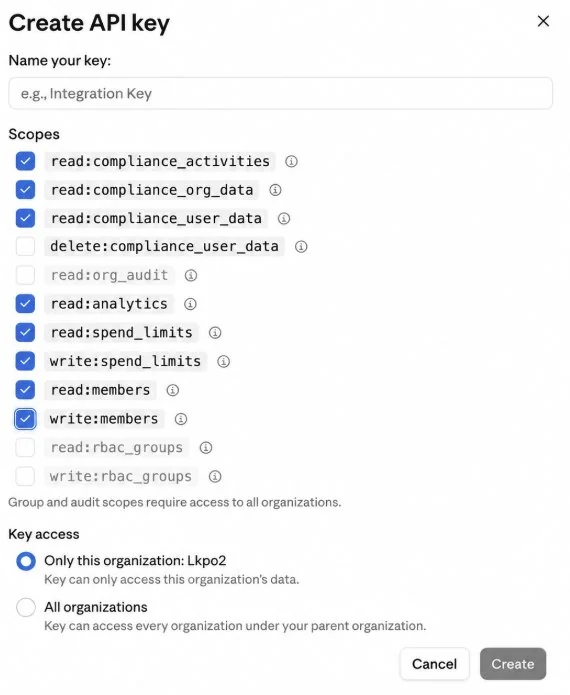
Setup
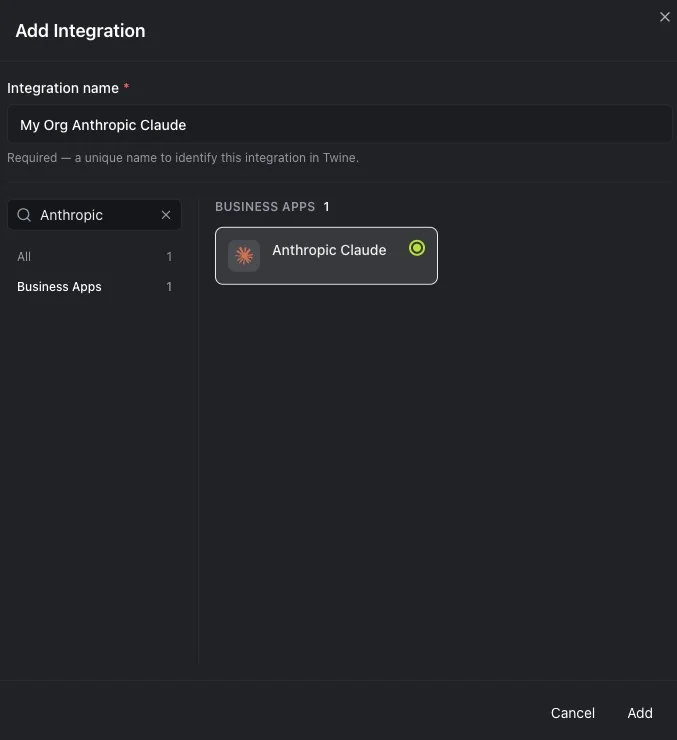
Create a new Integration
Test connection and validate it is successful
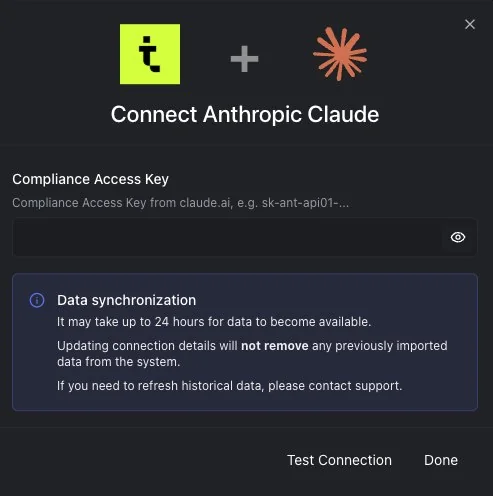
Wait up to 24 hours for the data to be populated
Usage examples
Once the setup is done, please allow up to 24 hours for the data to be imported. You will be able then to create a new chat in Alex and use the integration to:
- Get all members and their roles, integrations
- Get roles, groups
- Ask any question about users for example who has access to a specific connector
- Ask who got access to Claude Enterprise via invite or by admin (not via IDP/SSO)
- Update users roles (subject to approval)
- Remove a user (subject to approval)
- Create live widgets of the above
- more…
Troubleshooting
Test connection does not work
Validate you are entering the right API key (no space) and not the Admin API key
No data is available
The data from Claude Enterprise is harvested once a day at midnight UTC. Allow up to 24 hours after the integration and to see changes that has occurred in Claude enterprise
Otherwise please contact Twine's support at support@twinesecurity.com
